
Email Deliverability and Spam Guidelines in 2024
Relationship between email deliverability and spam email: Why are both Google and Yahoo enhancing their spam filtering system by introducing new guidelines in February 2024?
Did your email engagement metrics drop significantly?
Emails bounce or end up in the spam folder?
You?re most likely having issues with your email deliverability and the email sender?s reputation. That?s quite a common challenge that marketers face when implementing their email marketing strategies.
Starting in February 2024, Google and Yahoo will enforce new bulk-sending requirements for their email platforms.
Summary :
1. Bulk Sender Rules: Gmail and Yahoo will enforce new guidelines from February 2024, specifically targeting those sending 5,000 or more emails daily.
2. User-Focused Updates: To enhance the user experience, the changes include one-click unsubscribe, email authentication with DMARC, and a requirement to maintain spam complaint rates below 0.3%.
3. Marketing Priority: These rules predominantly affect marketing and promotional emails, excluding transactional messages from the scope of the regulations. They urge bulk senders to adapt for improved compliance.
Background: New changes are mainly being forced due to ChatGPT AI robot phishing. Most phishing is bulk phishing.
The driving force behind these updates is the shared commitment of Gmail and Yahoo Mail to reinforce sender responsibility, safeguard user protection, and preserve brand integrity. With many users facing an overwhelming 95% spam inundation, these tech giants are trying to declutter and enhance the email experience.
Note that these guidelines primarily affect marketing and promotional emails. Transactional messages, such as account notifications or password resets, generally remain outside the scope of these new regulations.
Why are Gmail and Yahoo making these changes?
These changes directly respond to the sudden rise in spam and phishing attacks.
The global metrics around email hacking are staggering. SlashNext, an email security platform, reported a 1,265% increase in phishing attacks over the past 12 months ? a rise they said is driven by artificial intelligence tools like ChatGPT. (SlashNext researchers even discovered online forums with tutorials about how to use ChatGPT to write phishing emails.) The platforms have responded with their own AI-based solutions.
Even as security companies adjust to protect users, more and more attacks are reported nearly every few weeks. Vade, another email security platform, saw more than 493 million phishing attacks in the third quarter of 2023, a jump of 173% just from Q2.
?These changes are like a tune-up for the email world, and by fixing a few things under the hood, we can keep email running smoothly. But just like a tune-up, this is not a one-time exercise. Keeping email more secure, user friendly, and spam-free requires constant collaboration and vigilance from the entire email community.?
Neil Kumaran Group Product Manager, Gmail Security & Trust
?We chose 0.3% because there are other companies and programs out there, and 0.3% or below is their requirement already. If your traffic sustains a spam rate above 0.3%, you?re probably already in a world of hurt. Generally, we look for much smaller numbers, but 0.3% resonates with the industry, so we chose to make it public.?
Marcel Becker, Sr Director of Product Management at Yahoo
Neil Patel : 3 new rules for email marketing to work. Click to listen
Resources : (click the link)
Google Spam Update in February 2024
Gmail Email Bulk Sending Guidelines 2024
Yahoo email sender guidelines 2024
One-Click Unsubscribe
Say goodbye to the hassle of multi-step unsubscribes! The list-unsubscribe header introduced a one-click mechanism that anti-spam crawlers ignored, making users opting out easier, lowering friction, and enhancing the overall email experience.
Starting February 2024, bulk messages must incorporate a URL version in the list-unsubscribe header. Ensuring email clients provide users with an easy "Unsubscribe" option in their interface, promoting a more user-friendly approach and mitigating spam complaints.
Email Authentication with DMARC
The new guidelines emphasise the implementation of DMARC (Domain-based Message Authentication, Reporting, and Conformance) for bulk senders. This step enhances email authentication, offering recipients a higher level of confidence in the legitimacy of their messages.
Keep Spam Complaint Rates Below 0.3%
Maintaining a low spam complaint rate is vital for your sender's reputation. Bulk senders must now keep their spam complaint rates below 0.3% to stay in the good books of Gmail and Yahoo. When users join your mailing list, deliver content that they want and value, and that aligns with their expectations.
In the end, it is not all doom and gloom.
These changes aren't revolutionary. Many of them have been best practices for years. If you prioritize user experience and use a reputable email marketing platform, most changes are business as usual.
What is email deliverability?
Email deliverability is the ability to deliver emails to your recipients? inboxes.
Determining your email deliverability is quite complex. It depends on many elements, such as the service provider, sender?s domain, quality of email list, email frequency, IP reputation, and overall sender?s reputation profile.
It?s vital to mention that email deliverability isn?t the same as a delivery rate. The delivery rate indicates the percentage of emails that your subscribers? mailboxes receive, even if they land in the spam folder. Meanwhile, deliverability is an indicator of inbox placement.
So, even with a sound delivery rate, you may still have deliverability issues.
What is a reasonable email deliverability rate?
It?s difficult to define what a reasonable email deliverability rate is. Return Path email deliverability statistics show that ?just 79% of commercial emails land in the inbox.? The rest is ?either sent to a spam folder or goes missing?most likely blocked by the mailbox provider.?
Every marketer's goal is to get an email delivered to 100% of subscribers. Unfortunately, marketers rarely achieve such a high rate.
You should pay attention to the following metrics when you track your overall email deliverability:
# 95% and higher is a reasonable delivery rate for an email service provider or ISP.
#The bounce rate, categorised into hard bounce and soft bounce, shouldn?t exceed 3%.
#You should be fine if the spam rate doesn?t exceed 0.08%.
Your email deliverability depends on the platform you use for sending emails. All email service providers or ISPs have different delivery rates, which most often fluctuate between 88% and 99%.
What is DKIM?
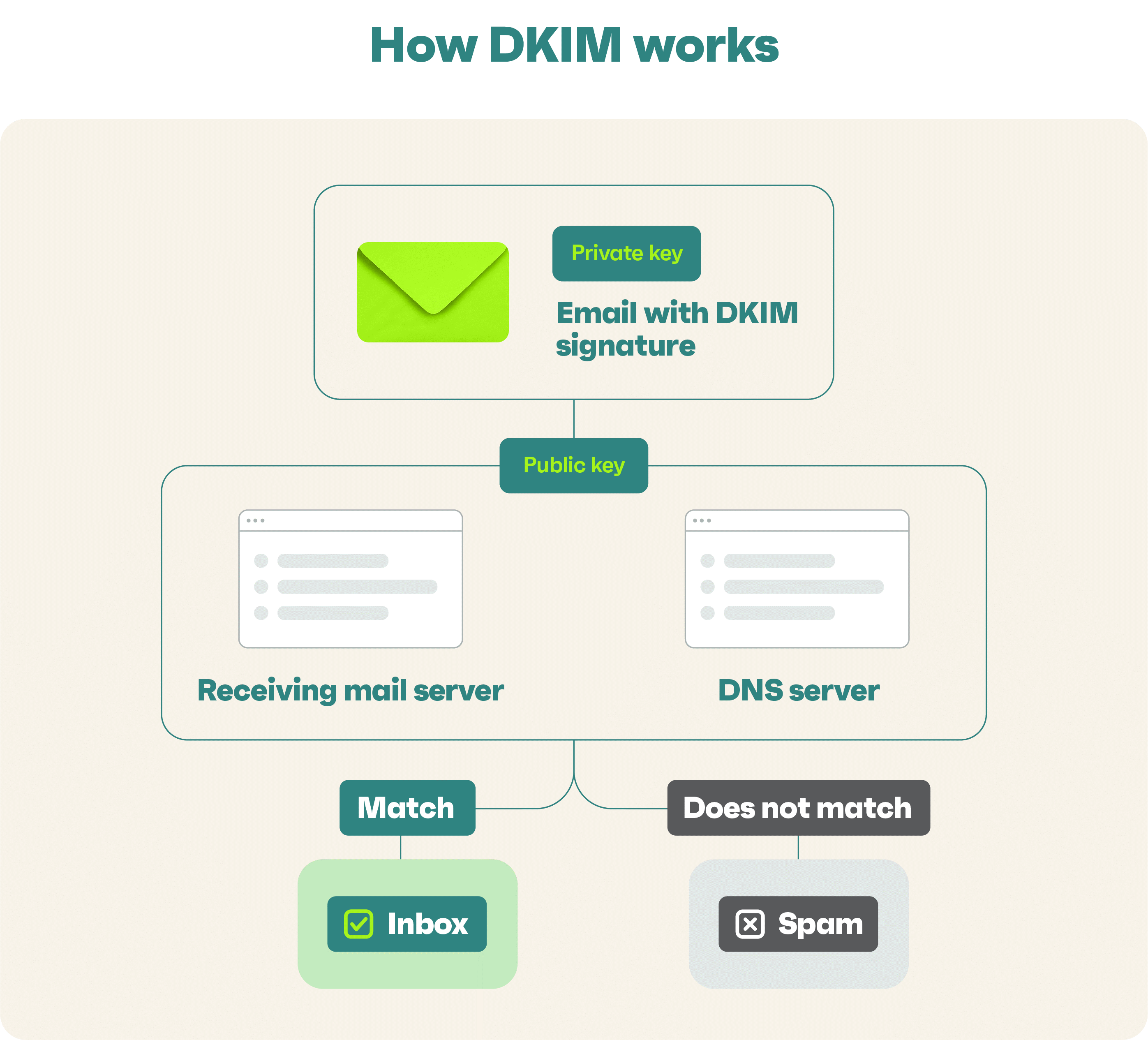
DKIM stands for DomainKeys Identified Mail. It is an email authentication method that allows the sender of an email to digitally sign the message using cryptographic techniques. DKIM aims to verify the email's authenticity and integrity, providing assurance that the email was not modified during transit and originated from the claimed domain.
Here's a simplified explanation of how DKIM works:
1. The sender's email domain (e.g., example.com) generates a pair of cryptographic keys?a private key and a corresponding public key.
2. Signing: When an email is sent, the sending mail server adds a DKIM signature to the email header. The signature is created by taking specific parts of the email, such as the message body and selected headers, and applying a cryptographic algorithm (e.g., RSA) using the private key of the sender's domain. This process generates a unique signature for each email.
3. DNS Record: The public key generated in step 1 is published in the sender's domain's DNS (Domain Name System) records. The public key is associated with a DKIM record that specifies the key and other parameters.
4. Receiving Server Verification: When the email reaches the recipient's mail server, the server can retrieve the public key from the DNS record of the sender's domain.
5. Signature Verification: The receiving mail server uses the public key to decrypt the DKIM signature in the email header. It then recalculates the signature using the same algorithm and compares it to the decrypted signature. If the two signatures match, the email has not been tampered with during transit.
6. Result and Handling: Based on the DKIM verification result, the receiving server can decide how to handle the email. For example, if the DKIM signature is valid, it may increase the trust level of the email. If the signature is invalid or missing, the server may treat the email cautiously or mark it as potentially suspicious.
DKIM helps combat email spoofing, phishing, and tampering by verifying the authenticity of emails. Organizations widely use it to improve email deliverability and enhance email security.
???????????
What is DMARC?
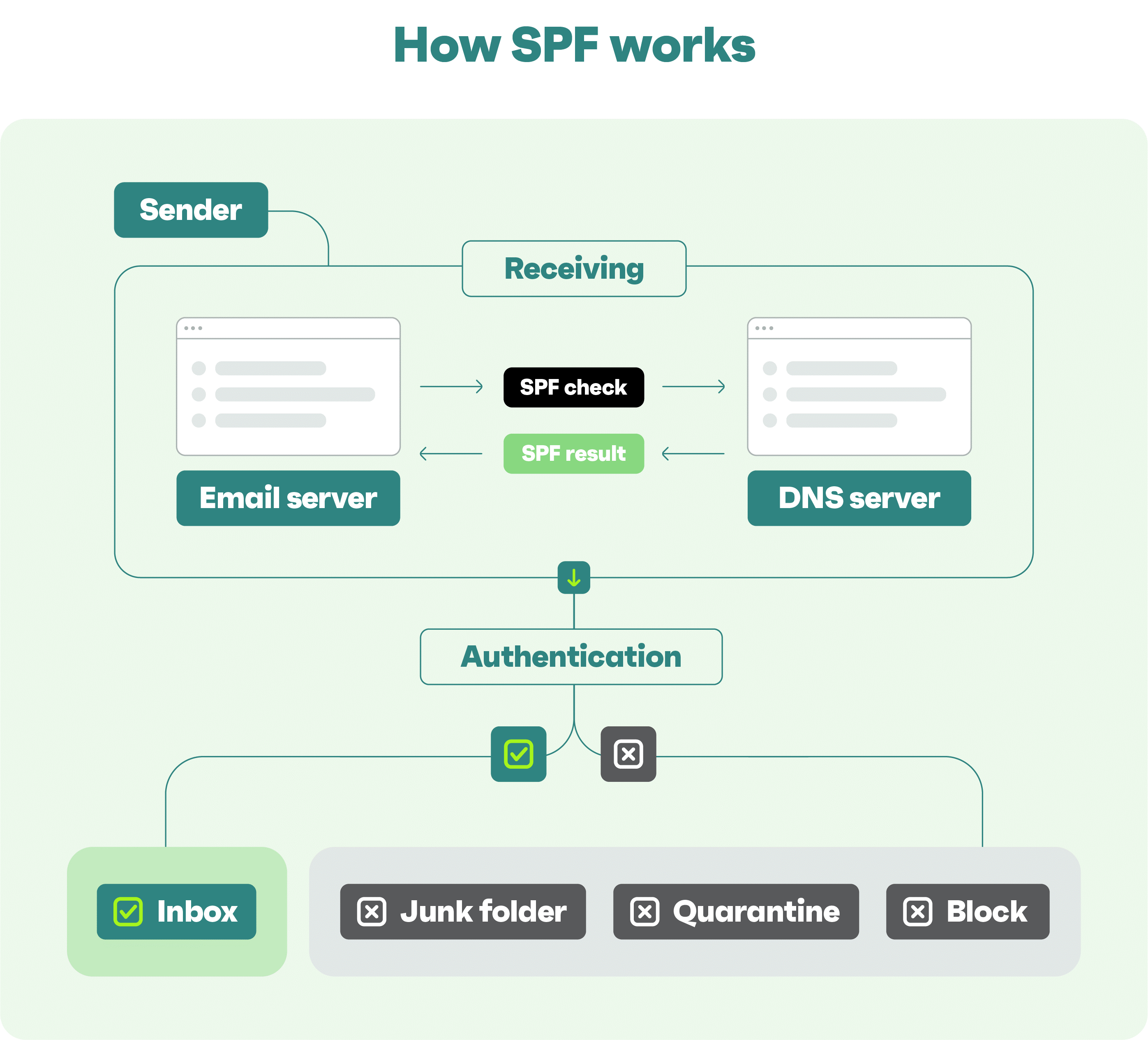
DMARC stands for Domain-based Message Authentication, Reporting, and Conformance. It is an email authentication protocol designed to combat email spoofing, phishing, and unauthorised use of domain names in email messages. DMARC builds upon the existing authentication methods, such as SPF (Sender Policy Framework) and DKIM (DomainKeys Identified Mail), to provide an additional layer of protection.
The primary goals of DMARC are as follows:
1. Domain Alignment: DMARC ensures that an email's "From" header domain matches the domains used in SPF and DKIM authentication. It helps prevent spoofed emails where the "From" domain is impersonated.
2. Authentication-Results: DMARC defines how email receivers should handle messages that fail authentication checks. The sender can specify whether such emails should be delivered, quarantined, or rejected.
3. Reporting: DMARC provides mechanisms for email receivers to send reports back to domain owners, informing them about the handling and disposition of emails claiming to be from their domain. These reports help domain owners monitor and analyze email flows, identify unauthorized use of their domains, and take appropriate actions.
Here's a simplified overview of how DMARC works:
1. Domain Owner Publishes DMARC Record: The domain owner (e.g., example.com) publishes a DMARC record in their DNS (Domain Name System) that specifies the DMARC policies, including the desired actions for failed authentication and reporting addresses.
2. Email Receiver Checks DMARC Policy: When an email is received, the email receiver checks whether the sender's domain has a published DMARC record.
3. SPF and DKIM Authentication: The email receiver performs SPF and DKIM checks to authenticate the email based on the sender's domain.
4. DMARC Evaluation: If the email passes SPF and/or DKIM authentication, the email receiver evaluates the DMARC policy defined in the sender's DMARC record.
5. DMARC Actions: Based on the DMARC policy, the email receiver takes the specified action (e.g., deliver, quarantine, or reject) for the email. The policy may also define how the email receiver should handle non-aligned "From" domains.
6. Reporting: The email receiver generates DMARC reports and sends them to the email address specified in the domain owner's DMARC record. These reports provide visibility into the authentication results and handling of emails claiming to be from the domain.
DMARC helps domain owners protect their brand reputation, increase email deliverability, and gain insights into email usage. It enables email receivers to make informed decisions about handling potentially fraudulent emails, ultimately reducing the risk of phishing attacks and email scams.
Under Builderall, Mailing Boss (an advanced automated email service provider) introduced a SUNSET policy in April 2024 to enhance Gmail and Yahoo with more security and trust and reduce spam.
What is Sunset policy under Builderall Mailing Boss (email service provider )?
A ?sunset policy? describes specified criteria when an email marketer concludes that a subscriber is inactive and takes action to suppress the email from commercial emails in the future.
Builderall?s sunset policy is an automated strategy used in MailingBoss to assist members in managing email lists effectively. The policy involves suppressing inactive subscribers from an email list after a certain period of inactivity. Here?s how it typically works:
Defining Inactivity: The first step is to define what constitutes inactivity. Subscribers are suppressed if they do not open or click a link in an email over a specified time or after being sent a specific number of emails. Builderall?s automated policy suppresses subscribers due to no engagement for 6 months or no engagement within the last 12 sent email campaigns.
Note: Email engagement means opening a message, clicking on a link, or subscribing to any other list of the same client.
Suppressing Inactive Users: Subscribers who still do not engage after the re-engagement attempts are then suppressed from the list. Unless you bypass the automated sunset policy settings, they will not receive future emails. This ensures that the email list remains high-quality and focused on engaged subscribers.
Benefits of the Policy: The sunset policy helps maintain a clean email list, improve email deliverability rates, and ensure compliance with anti-spam laws. It also provides more accurate metrics for email campaign effectiveness, as the focus is on engaged subscribers.
Periodic Review and Adjustment: You must periodically review your subscriber lists and the list of suppressed subscribers. During that review, you can move your suppressed subscribers to a different ?suppression list? or delete the suppressed subscribers from your account.
Why need double opt-in or first-time signing up for a new email newsletter from a provider? What is double opt-in?
A double opt-in email is your powerhouse for ensuring that your audience genuinely wants to receive your emails. Unlike the one-click simplicity of single opt-ins, the double opt-in requires an extra step.
After the initial sign-up, users receive a confirmation email. They must take this crucial second step by clicking the provided link to verify their subscription. This added layer significantly minimizes accidental or unauthorized sign-ups.
Imagine you are signing up for newsletters or updates. After you say you?re interested, they email you to be extra sure. There?s a button or link in that email, and you just click it to confirm. That way, only those truly interested in your stuff will get on the list.
?????
Double opt-in isn?t just about avoiding spam or mistakes; it is a smart way to ensure that your marketing plans reach the best audience.
Double opt-in also ensures that your subscribers want to receive your emails by adding the extra step to the signup process. That means they'll be more likely to engage with your emails and less likely to unsubscribe or react to spam complaints.
Double Opt-in vs Single Opt-in
As you just learned, a double opt-in is where subscribers confirm their email address twice, first by signing up and then by confirming their subscription through a confirmation email sent to their inbox.
Comparatively, a single opt-in is more appropriate if your sole purpose is to collect leads with broader interests and you have proper email validation and verification services in place.
A double opt-in is more useful when collecting targeted leads and ensuring your emails have higher chances of conversion.
Benefits of Using Double Opt-in Emails
Using double opt-in emails is definitely super helpful for targeted email marketing. The following are its key benefits:
i. Enhanced Email List Quality and Engagement
When you use double opt-in emails, you ensure that your email list is top-notch. With the extra confirmation step, you ensure that you are only sending emails to people who are willing to receive them. This means these leads will be more engaged with your emails, leading to higher email campaign performances.
ii. Reduced Spam and Bounce Rates
The double opt-in means the recipients are aware of you and are open to receiving your emails, even promotional ones. This essentially reduces the chance of your leads marking your emails as spam.
Moreover, the confirmation email will only reach the prospect if he provides a valid email address. Hence, you won?t have any new invalid emails, resulting in no email bounces.
iii. Legal and Compliance Advantages
Double opt-in emails bring distinctive legal advantages, ensuring alignment with data protection regulations such as GDPR (General Data Protection Regulation) and the CAN-SPAM Act.
The confirmation process serves as documented proof of user consent, which is a crucial component in meeting privacy laws. It demonstrates a commitment to ethical and transparent communication practices and nurtures positive relationships with your audience.
Moreover, certain countries, including Canada and several European nations, legally require double opt-in.
Introducing Builderall - Mailing Boss email provider :
Electronic Direct Mail (EDM)
Mailing Boss (Automated Email System)
MailingBoss is a powerful email automation tool that lets you easily capture qualified leads and send emails to your list. You can also create email sequences and view all your automation steps on a workflow dashboard.
Plus, MailingBoss comes with professional integrations, automation with tags, and the option to use Telegram notifications. So you can always stay up-to-date on what?s going on with your leads.
Performance overview. MailingBoss comes with overview stats so you can easily check how your emails are doing. (You can view an unsubscriber list with the date/time and reasons for unsubscribing). You can clean up your list with lead scores. Plus, you can categorize lists, use CRM integration, and build viral lists.
Lead scoring is assigning values to your leads based on their online behaviour, personal information, and engagement with you through email and text. A lead scoring system will allow you to automate tracking and labelling leads exhibiting sales-ready behaviours. Lead score is a numerical value given to a subscriber based on the interactions in MailingBoss. It is possible to add or remove lead score points. Interactions to change lead score include opening an email campaign or clicking a link in an email. You can set the point value in ?settings? and ?account? in MailingBoss. For example, if the lead score is < 50 points (zero opening email), those inactive emails will be categorised as inactive emails (this way, will clean up bad emails).
A lead score assigns a score to each action your lead takes in your digital business. When the lead has reached enough points, you can send personalized and targeted communication to encourage them to move on to the next stage of your sales funnel.
Email Preheader function within the Mailing Boss
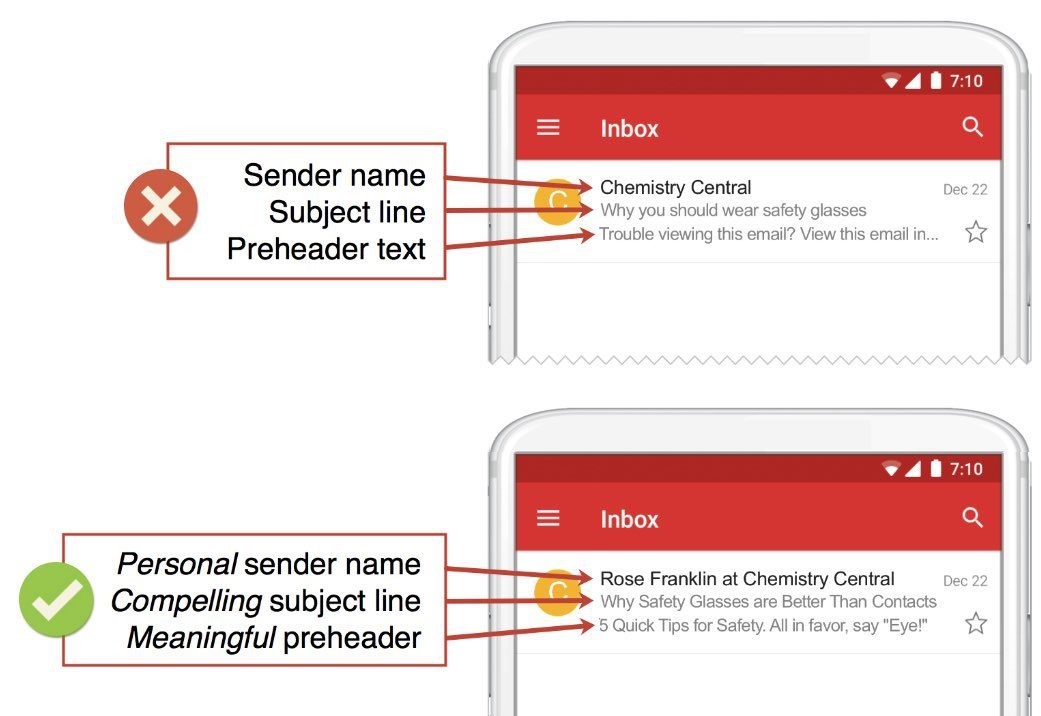
There is an email preheader function where you can use Text or Emoji inside Mailing Boss Email.
An email preheader is a brief text you see after the sender information and the subject line when looking at an email in your inbox. This email preheader might not seem particularly important, but it?s one of the first things readers see in your emails. This will indirectly increase your email open rate and sales conversion.
These email preheader texts can make all the difference! A well-crafted preheader can increase your open rate, engage your audience, and drive interest in your email content.
Without a well-crafted preheader, your messages can end up in inbox limbo. Grabbing the recipient's interest before they open the email is a challenge!
Here are 4 powerful tips to explore in the preheader of your following email:
Be transparent and objective: in a nutshell, convey the essence of your email and pique the recipient's curiosity to open and read your entire message.
Capture attention with a question or offer: ask a thought-provoking question or offer something irresistible to encourage the reader to click and capture their attention.
Use relevant keywords: Use pertinent terms to your email content and pique the interest of your target audience.
Try different approaches and see what works best for your audience. Don't be afraid to experiment! Try different combinations of words, styles, and calls to action to find out what generates the best results for your specific audience.
Most importantly, with MailingBoss, you have that extra resource to improve your marketing efforts.
What is Builderall? It is an automated customer engagement tool that includes tools such as a Quiz funnel, WhatsApp, Chatbot, email, etc. You can check it out here.
Email marketing influences 59% of people's purchase decisions.
Are you ready to unlock the secrets to converting up to 60% more through email without costly ads?
Start your journey toward mastering email marketing strategies proven to grow your audience, enhance your brand, and drive sales.
Introducing Email Marketing Mastery Course (30 hours) self-learning), find out more, please click here